AB-650 Study Plan: 30 Days to the AI Services Administrator Exam (2026)
A realistic four-week study plan for Microsoft exam AB-650 (Administering Microsoft 365 and AI Services), mapping the three official skill domains to daily Microsoft Learn modules and hands-on tenant practice.
Examinotion Team
Last updated: September 2026. Fact-checked against the official Microsoft Learn AB-650 study guide, exam and certification pages.
TL;DR: Thirty days is enough to pass Exam AB-650: Administering Microsoft 365 and AI Services if you already administer Microsoft 365. Spend week one on tenant and workload configuration, weeks two and three on identity, security and Purview, and week four on Copilot and agent governance, matching Microsoft's published domain weightings.
Microsoft has introduced AB-650 (Administering Microsoft 365 and AI Services), the exam that leads to the Microsoft 365 Certified: Microsoft 365 and AI Services Administrator Associate credential [1] [3]. It arrives as MS-102 heads towards retirement on 30 November 2026, and it adds a large new layer of Copilot and agent administration on top of familiar Microsoft 365 tenant work [2] [5]. This guide turns the official skills outline into a realistic week-by-week 30-day study plan, weighted to match how Microsoft actually scores the exam.
How long does it take to study for AB-650?
Most working administrators need three to five weeks of structured preparation for AB-650, assuming one to two hours of study on weekdays and longer hands-on sessions at weekends. Microsoft does not list a mandatory prerequisite, but it recommends prior experience with Microsoft 365 workloads, Microsoft Entra ID, Microsoft Defender XDR and Microsoft Graph PowerShell [2]. If you are new to Microsoft 365 administration, plan for eight weeks or more rather than 30 days.
Thirty days works because the exam has a clear centre of gravity. One domain, Govern and secure Microsoft 365 tenants and workloads, carries 40 to 45 percent of the marks on its own [1]. A plan that gives that domain the most time, then splits the remaining effort between tenant configuration and the new AI-services domain, matches effort to reward. That is exactly how the four weeks below are structured.
Honesty matters here: AB-650 is an Associate-level exam and it is broad rather than shallow. The security domain alone spans Entra identity, authentication and access, Defender for Office 365 and Microsoft Purview, which is a wide surface for one exam [1]. Reading alone will not get you to the 700 out of 1,000 scaled score you need to pass [1] [3]. Budget real time in an administration portal wherever you can.
What the AB-650 exam covers in 2026
The official study guide lists three skill domains with published weightings [1]. Every hour in this plan maps back to one of these weightings.
| Skill domain | Weighting |
|---|---|
| Configure and manage Microsoft 365 tenants and workloads | 20-25% |
| Govern and secure Microsoft 365 tenants and workloads | 40-45% |
| Manage and secure AI services in Microsoft 365 | 35-40% |
The three domains map one-to-one onto three official Microsoft Learn learning paths, which together hold 17 training modules [6] [7] [8]. That structure is what makes a day-by-day plan practical: you can point each study day at a real module rather than a vague topic. The security domain has the most modules and the most marks, so it earns the most days below.
AB-650 is a single stand-alone Associate exam. Unlike the MS-102 credential it succeeds, which required a second associate certification to reach Expert level, AB-650 needs no companion exam [2] [3]. Passing AB-650 alone earns the full certification.
Before you start: what you need
AB-650 is in public beta as of September 2026, and that changes a few practical things [1] [2]. Beta exams do not return a score on the day. Microsoft releases beta scores about 10 days after the exam goes live worldwide, which is usually 10 to 12 weeks after the beta period opens, so you may wait up to roughly 14 weeks for your result [4]. Passing the beta still counts towards the certification, and you do not need to resit once the exam goes live [4].
Lab access is the biggest practical hurdle. The AI-services learning path expects a Microsoft 365 E5 tenant, and it prefers an E7 (Frontier) tenant because that bundles Microsoft Agent 365 and Microsoft Entra Suite licensing used in the agent-identity exercises [8]. If you do not have that access at work, a Microsoft 365 developer tenant plus the documentation walkthroughs will still let you learn the concepts, but expect the agent labs to be read-only.
Microsoft has not published an official practice assessment for AB-650 yet. The exam page states that practice assessments are usually available within eight weeks of an exam going out of beta [2]. Until then, rely on the learning paths, the study guide and your own tenant practice rather than searching for an official practice test that does not exist.
The 30-day AB-650 study plan
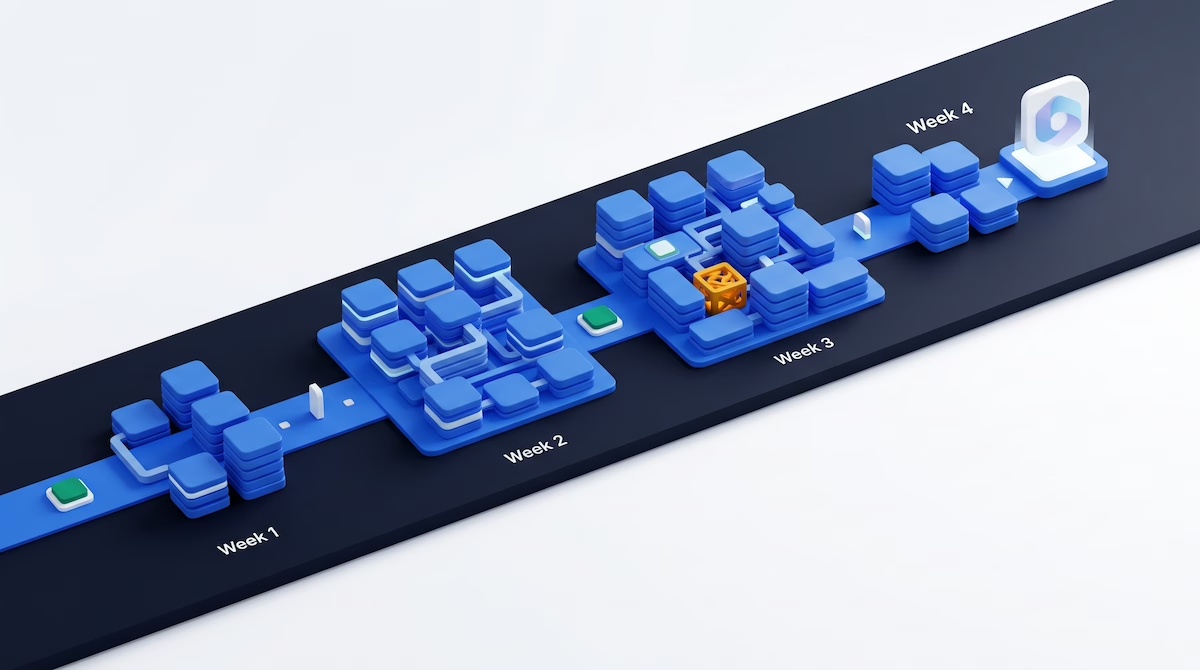
This plan runs across four weeks and 30 days. It front-loads tenant configuration in week one, spends weeks two and three on the 40 to 45 percent security domain, moves to the AI-services domain in week four, and keeps the final two days for revision and exam readiness. Adjust the daily hours to your own diary; the sequence matters more than the exact clock time.
Week 1 (Days 1-7): Configure and manage tenants and workloads
Week one covers Domain 1, worth 20 to 25 percent, using the five modules in the first learning path [6]. This is the most familiar ground for a serving administrator, so it is a confidence-building start.
| Day | Focus | Microsoft Learn module |
|---|---|---|
| 1 | Orientation and setup | Read the study guide, skim the exam page, set up your practice tenant [1] [2] |
| 2 | Tenant provisioning and branding | Provision and brand a Microsoft 365 tenant [6] |
| 3 | Licensing at scale | License Microsoft 365 and AI services at scale [6] |
| 4 | Resilience and health | Keep a Microsoft 365 tenant resilient and healthy [6] |
| 5 | Exchange and Teams workloads | Configure Exchange Online and Microsoft Teams workloads [6] |
| 6 | SharePoint and OneDrive for Copilot | Govern SharePoint and OneDrive for Microsoft 365 Copilot [6] |
| 7 | Review and practise | Redo the licensing and SharePoint permission tasks by hand |
Pay attention to licensing, because AB-650 explicitly covers group-based and pay-as-you-go licensing plus the newer AI-service licences for Microsoft 365 Copilot, Microsoft Agent 365 and Copilot Studio [1]. The SharePoint and OneDrive module matters more than it looks: site permissions and oversharing controls set up here reappear in the Copilot readiness work in week four.
Week 2 (Days 8-14): Govern and secure, part one (identity and access)
Week two starts the largest domain, worth 40 to 45 percent, with the first two modules of the security learning path [7]. Identity is the foundation of everything that follows, so give it real attention.
| Day | Focus | Microsoft Learn module |
|---|---|---|
| 8 | Entra identities | Provision and govern identities in Microsoft Entra [7] |
| 9 | Groups, roles and PIM | Same module: administrative units and Privileged Identity Management [7] |
| 10 | Bulk management | Practise user and group tasks with Microsoft Graph PowerShell [1] [7] |
| 11 | Authentication methods | Implement authentication and access in Microsoft Entra [7] |
| 12 | Conditional Access | Same module: Conditional Access, MFA and Entra ID Protection [7] |
| 13 | Self-service and troubleshooting | Password protection, self-service password reset and auth troubleshooting [7] |
| 14 | Review and practise | Build a Conditional Access policy end to end in your tenant |
Microsoft Graph PowerShell appears in the recommended experience for a reason [2]. The exam expects you to manage identities in bulk, so practising a few real Graph PowerShell commands is worth more than reading about them. Conditional Access is a heavily weighted topic across Microsoft security exams, and AB-650 is no exception.
Week 3 (Days 15-21): Govern and secure, part two (threats and Purview)
Week three finishes the security domain with the last three modules of the learning path, covering Microsoft Defender for Office 365 and Microsoft Purview [7]. Purview is where several of the new AI-governance ideas first appear, so do not rush it.
| Day | Focus | Microsoft Learn module |
|---|---|---|
| 15 | Defender for Office 365 | Secure email and collaboration with Microsoft Defender for Office 365 [7] |
| 16 | Threat response | Same module: threat policies, investigation and attack simulation training [7] |
| 17 | Information protection | Protect information with Microsoft Purview information protection [7] |
| 18 | Sensitivity labels | Same module: sensitive information types and label policies [7] |
| 19 | Data loss prevention | Prevent data loss and govern the data lifecycle with Microsoft Purview [7] |
| 20 | DSPM for AI | Same module: Purview Data Security Posture Management for AI [1] [7] |
| 21 | Review and practise | Consolidate the whole security domain with a self-test |
Microsoft Purview Data Security Posture Management (DSPM) for AI is one of the headline new topics on AB-650 [1]. It is the bridge between traditional data protection and the Copilot work in week four, because it is how administrators find and fix the oversharing risks that make Copilot unsafe to enable. Treat day 20 as a linking concept, not an afterthought.
Week 4 (Days 22-28): Manage and secure AI services
Week four covers Domain 3, worth 35 to 40 percent, using the seven modules of the AI-services learning path [8]. This is the newest material on the exam and the reason AB-650 exists, so it deserves full focus even though it comes last.
| Day | Focus | Microsoft Learn module |
|---|---|---|
| 22 | Copilot readiness | Assess readiness and roll out Microsoft 365 Copilot [8] |
| 23 | Oversharing and data readiness | Same module: resolve data leaks, oversharing and compliance for Copilot [1] [8] |
| 24 | Copilot settings and extensibility | Configure Microsoft 365 Copilot settings and extensibility [8] |
| 25 | Entra Agent ID | Establish agent identities and secure access with Microsoft Entra Agent ID [8] |
| 26 | Agent registry and Agent 365 | Curate and control agents with the Agent Registry and Agent 365 tools [8] |
| 27 | Govern and monitor agents | Monitor, govern and optimise Microsoft 365 AI services with Agent 365 [8] |
| 28 | Review and practise | Re-walk the Copilot enablement and agent-governance flows |
The two genuinely new concepts here are Microsoft Entra Agent ID and Microsoft Agent 365 [1] [8]. Entra Agent ID gives an AI agent its own identity so it can be governed like a user, with access packages and Conditional Access. Agent 365 is the tooling that discovers, secures, monitors and governs those agents across the tenant. Expect the exam to test how you enable Copilot safely and how you keep agents under control after that.
Days 29-30: Final revision and exam day
Use day 29 for targeted revision. Go back to the study guide and mark every bullet you are unsure about, then re-read only those [1]. Spend extra time on the security domain, since it carries the most marks, and on Entra Agent ID and Agent 365, since they are the newest and least familiar. Try the free exam sandbox so the interface holds no surprises on the day [2].
Day 30 is exam day. If you are sitting the beta, remember you will not see a score immediately, so do not panic when the screen shows no result [4]. Read each question carefully, use the review flag for anything you want to revisit, and manage your time steadily across all three domains. For a walkthrough of how Microsoft beta results and scoring work, see our Microsoft beta exam guide.
AB-650 and the MS-102 retirement
Microsoft is retiring MS-102 on 30 November 2026, and AB-650 covers much of the same tenant, identity, Defender and Purview ground [5]. If you were planning to sit MS-102, AB-650 is the natural exam to target instead, and it adds the Copilot and agent-administration skills that a modern Microsoft 365 estate now demands [1].
The important structural difference is the credential shape. MS-102 was one half of a two-exam path towards an Administrator Expert credential, which also required a separate associate certification [2]. AB-650 is a single Associate exam that earns its certification on its own [3]. You are not signing up for a second exam, so budget your time accordingly. For the wider picture of how Microsoft's certifications fit together, see our Microsoft AI certification roadmap.
What AB-650 does not cover
AB-650 is scoped entirely to Microsoft 365 workloads, identity, security and the AI services that sit on top of them. It does not test Azure AI Foundry, now called Microsoft Foundry, or the developer skills covered by exams such as AI-102 and AI-103 [1]. If your interest is building AI applications rather than administering them, AB-650 is the wrong exam, and you should look at the developer track instead.
It also stops short of broad endpoint management. Intune device configuration and the wider endpoint-administrator content sit outside the three AB-650 domains [1]. Knowing where the boundary lies saves revision time: you do not need to study Foundry model deployment or Intune policy for this exam. To compare the administration-focused options, browse the full catalogue of Microsoft AI exam preparation courses.
Frequently Asked Questions
Is AB-650 hard?
Microsoft does not publish a difficulty rating or pass rate for AB-650. The main challenge is breadth: the security domain alone is 40 to 45 percent of the marks and spans Entra identity, authentication, Defender for Office 365 and Purview [1]. A serving Microsoft 365 administrator will find the pace manageable with a structured 30-day plan and hands-on practice.
How long should I study for AB-650?
Plan for three to five weeks if you already administer Microsoft 365, at one to two hours on weekdays plus longer weekend sessions. The three official learning paths hold 17 modules in total, which fits a 30-day schedule weighted towards the security domain [6] [7] [8]. Newcomers to Microsoft 365 administration should allow eight weeks or more.
Do I need to pass MS-102 first?
No. AB-650 has no mandatory prerequisite exam, and MS-102 is a separate credential that retires on 30 November 2026 [2] [5]. Microsoft recommends prior experience with Microsoft 365 workloads, Microsoft Entra ID, Microsoft Defender XDR and Microsoft Graph PowerShell, but none of these is a required certification [2]. You can sit AB-650 directly.
How much does the AB-650 exam cost?
Microsoft does not publish a single AB-650 price on the official exam page, stating that the fee depends on the country or region where the exam is proctored [2]. Associate exams commonly sit around the same price point worldwide, and local taxes may apply. Check the exam page for the fee shown for your region before booking.
Is AB-650 worth taking while it is still in beta?
Sitting the beta lets you certify early, before the scoring model and content are finalised, and a beta pass counts fully towards the certification [4]. The trade-offs are a wait of up to roughly 14 weeks for your result and no official practice assessment yet [2] [4]. If you are comfortable preparing from the learning paths, the beta is a reasonable route.
What is Microsoft Entra Agent ID?
Microsoft Entra Agent ID gives an AI agent its own identity in Microsoft Entra, so administrators can govern the agent like a user account [1] [8]. That means applying access packages, Conditional Access and ownership to agents, then monitoring and securing them through Microsoft Agent 365. It is one of the newest and most heavily tested concepts on AB-650.
Conclusion
AB-650 rewards structured preparation: one domain carries most of the marks, the three official learning paths map cleanly onto the outline, and the newest material, Copilot enablement and agent governance, is exactly what modern Microsoft 365 administration now requires. Follow the four-week structure, practise in a real tenant wherever you can, and give the security domain the time its weighting demands.
When you are ready to choose your certification path or track new practice sets as they launch, browse the full catalogue of Microsoft AI exam preparation courses. If AB-900 fundamentals would help you build a base first, start with our guide on how to pass the AB-900 exam and the deeper Microsoft Copilot agents business guide.
Sources
- Study guide for Exam AB-650: Administering Microsoft 365 and AI Services — Microsoft Learn, accessed 2026-09-18
- Exam AB-650: Administering Microsoft 365 and AI Services — Microsoft Learn, accessed 2026-09-18
- Microsoft 365 Certified: Microsoft 365 and AI Services Administrator Associate — Microsoft Learn, accessed 2026-09-18
- About beta exams — Microsoft Learn, accessed 2026-09-18
- Exam MS-102: Microsoft 365 Administrator — Microsoft Learn, accessed 2026-09-18
- Configure and manage Microsoft 365 tenants and workloads — Microsoft Learn, accessed 2026-09-18
- Govern and secure Microsoft 365 tenants and workloads — Microsoft Learn, accessed 2026-09-18
- Manage and secure Microsoft 365 AI services — Microsoft Learn, accessed 2026-09-18
Related Articles

AB-650 Practice Questions and Answers: 15 Worked Examples (2026)
There is no official AB-650 practice assessment yet. Test yourself with 15 original scenario questions across all three skills domains, from Microsoft 365 Backup and PIM to Copilot DLP, agent identities and the agent registry, each with a worked explanation.

AB-900 vs AB-650: Which Microsoft 365 Admin Certification Should You Take in 2026?
AB-900 is a 45-minute Fundamentals exam that never expires; AB-650 is the Associate exam that tests Entra ID, Defender, Purview, Copilot and agent administration in depth. Compare both side by side and pick the right path for your experience.

AB-731 Licensing and Cost Models: Copilot, Pay-As-You-Go and Foundry Commitment Tiers (2026)
AB-731 tests Copilot licence types, Foundry Tools pricing models and generative AI cost drivers. Here is how pay-as-you-go, commitment tiers and tokens work, and the traps to avoid.